Reduce no-shows
Earlier, clearer prompts recover calendar slots before they are lost to idle time.
Victory Team Consultation
Protect calendars with respectful, multi-channel reminders triggered from appointment metadata and client preferences—so attendance improves without spamming your list.
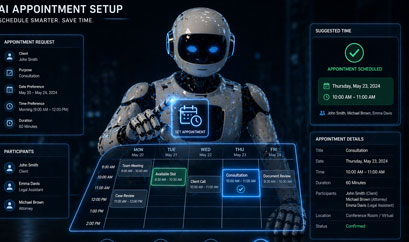
Missed appointments are not merely inconvenient—they cascade. A no-show for a medical evaluation delays demand drafting; a missed deposition prep call compresses attorney time into panic hours; a forgotten client intake blocks downstream automation that was waiting on a single field. The AI Appointment Reminder module treats attendance as a system input with the same seriousness as document uploads.
Reminders are multi-channel because clients differ: some read SMS instantly, some live in email, and some still answer voice calls when driving between shifts. Preferences are stored per client and per matter type so you are not blasting every channel every time.
Scheduling intelligence respects quiet hours, time zones, and regulatory constraints you configure. Escalation ladders can move from gentle nudges to firmer language or staff phone trees when high-value appointments approach without confirmation.
Each channel has strengths. SMS excels at immediacy but demands concise copy. Email carries richer instructions and attachments. Voice can break through when literacy or accessibility is a concern. The portal lets you define channel order and backoff rules so clients experience coordination, not harassment.
TCPA-style considerations, healthcare marketing sensitivities, and firm-specific ethics opinions can be encoded as policies: who may receive automated calls, which templates require pre-approval, and how opt-outs propagate across related matters.
Dashboards show confirmation rates, channel effectiveness, and lead time distributions. If Tuesday afternoons underperform, you adjust timing—not volume—because the system distinguishes structural issues from copy issues.
High-risk appointments can require human confirmation before resources are committed—interpreter booking, expert travel, or multi-party hearings. Reminder flows can pause until a coordinator marks readiness.
Better attendance improves revenue, client satisfaction, and case velocity simultaneously.
Earlier, clearer prompts recover calendar slots before they are lost to idle time.
Helpful reminders feel like service, especially when they include prep checklists or parking maps.
Coordinators spend less time on manual dial-around and more time on exceptions.
Template libraries enforce consistent, professional language across offices.
Clinics coordinating treatment plans with counsel.
Law firms scheduling client workshops or mediation prep.
Insurance field inspections where route density matters.
Everything starts from structured appointment records.
Time zone, location modality, required prep, and preferred channels feed scheduling rules.
Multi-step reminder ladders fire with spacing tuned to appointment lead time.
Client confirmations update tasks automatically; non-responses escalate per policy.
Tasks assume dates are reliable. Reminder automation is how you make that assumption true without heroic manual effort.
Straight answers about how this module fits real legal, insurance, and client-service operations.
Yes. Channel preferences are granular and can be updated by clients or staff with appropriate permissions.
Sequences automatically reset when appointment records change, preventing duplicate or stale reminders.
Both patterns are supported depending on regulatory posture and branding requirements.
Yes. Deep links can route clients directly to prep tasks or document uploads tied to the appointment.
Office-level and program-level dashboards summarize attendance trends, channel mix, and template performance.
Continue exploring modules that pair naturally with this capability.
Deploy reminders that respect clients while protecting your team’s time. Connect attendance to tasks and workflows automatically.